
Buying a smartphone used to feel simple. You picked a model, checked the price, and that was mostly it. Now there are cloned devices, copied packaging, and fake listings that look almost identical to genuine products. That is why searches related to fake phone check keep growing, especially on websites like tech news daily where people look for practical buying advice before spending money. When users search for How to check phone is original or fake, they usually want quick confirmation before buying a second-hand phone or an unusually cheap device online.
The problem is that modern counterfeit phones are better than they used to be. Some fake devices copy logos, interfaces, and even startup animations. A few can look convincing for the first couple of hours.
People are also comparing technology more carefully now before making purchases. Even discussions like claude vs gemini vs chatgpt which one is better? reflect how users have become more cautious about digital products and authenticity.
And at the same time, security tools are becoming part of the conversation too. Comparisons like Express vpn vs surfshark show how users now think more seriously about privacy, device trust, and overall mobile security.
Table of Contents
How to check phone is original or fake using IMEI and basic verification
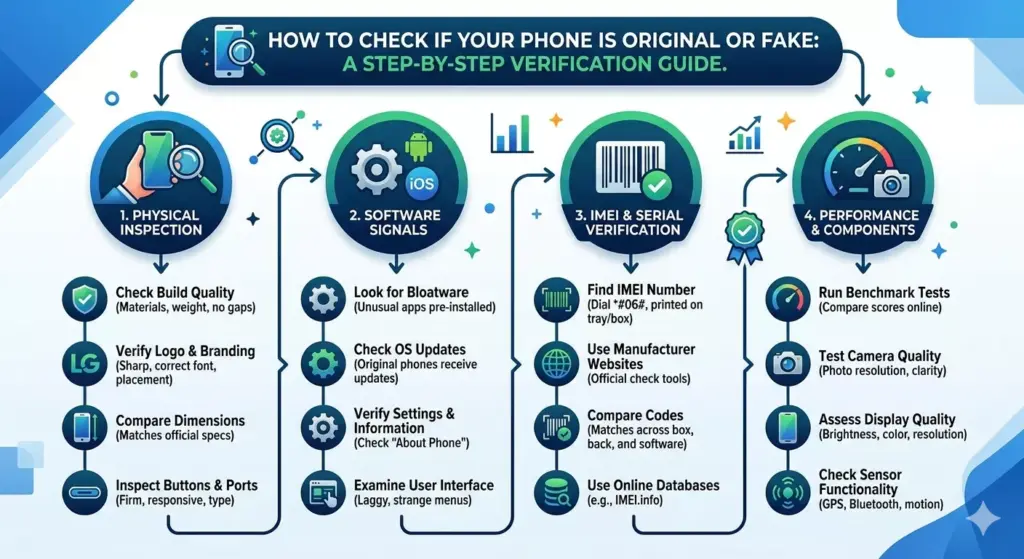
The most reliable starting point for How to check phone is original or fake is usually the IMEI number.
Every legitimate smartphone comes with a unique IMEI linked to its manufacturer and model information. A fake device may use copied numbers, invalid entries, or mismatched records.
You can find the IMEI number by:
- Dialing *#06#
- Checking device settings
- Looking at the phone packaging
- Reading the SIM tray label
This is the first step in proper original phone verification.
What an IMEI number actually tells you
The IMEI number works like a digital identity card for a smartphone.
A proper IMEI check can reveal:
- Phone brand
- Device model
- Storage variant
- Warranty details
- Activation status
This helps with mobile phone verification, especially when buying used devices.
A mismatch between the device and IMEI database is often a warning sign during a fake phone check.
Using official manufacturer websites for verification
One of the safest methods for smartphone authenticity checks is using the official manufacturer website.
Most brands allow users to enter:
- IMEI number
- Phone serial number
- Phone model number
This confirms if the device exists in official records.
This is widely used for:
- iPhone authenticity checks
- Android phone check procedures
- Warranty confirmation
It is also one of the easiest ways to detect a counterfeit smartphone.
Step by step guide to identify fake smartphones and cloned devices
People often expect fake phones to look obviously bad, but modern copies can be surprisingly close.
A proper fake phone check usually includes:
| Check Area | What to look for |
|---|---|
| IMEI number | Invalid or duplicated records |
| Phone packaging | Poor print quality |
| Hardware quality | Weak materials or loose buttons |
| Software updates | Missing official support |
| Device specifications | Fake RAM or storage claims |
This kind of mobile phone verification helps spot cloned or modified devices before purchase.
Phone packaging still reveals a lot
Even high-end fake devices often fail in small details related to phone packaging.
Common signs include:
- Incorrect spelling
- Weak print quality
- Missing accessories
- Wrong logos
- Different fonts
A genuine device usually has consistent branding and clean packaging design.
This sounds small, but many cases of counterfeit smartphone sales become obvious from the box itself.
Checking device specifications properly
Another important step in How to check phone is original or fake is reviewing the actual device specifications.
Fake phones sometimes advertise:
- More storage than available
- Fake camera quality
- Incorrect processor details
- Lower display resolution
Apps and settings menus can help confirm real hardware information.
This is especially important during an Android phone check, since modified Android systems can mimic premium models visually.
Hardware quality and build consistency
A real smartphone usually feels refined in ways that are hard to fake completely.
Things to inspect:
- Button alignment
- Camera finish
- Screen brightness
- Speaker quality
- Charging port fit
Low hardware quality is often one of the biggest clues during a fake phone check. Counterfeit devices may look acceptable from a distance but feel inconsistent during actual use.
Software updates and system behavior
Official phones receive regular software updates from manufacturers.
A fake device may:
- Never receive updates
- Use modified Android versions
- Show fake interface skins
- Lack security patches
This affects both usability and mobile security. If a phone cannot connect properly to official update systems, that is often a warning sign for poor smartphone authenticity.

iPhone authenticity checks
Checking iPhone authenticity is usually more structured because Apple devices are tightly controlled.
Useful checks include:
- Verify IMEI on Apple systems
- Check Apple ID lock status
- Confirm serial number
- Review activation details
A cloned iPhone often fails during original phone verification because Apple servers identify mismatched records quickly.
Android phone check methods
An Android phone check depends more on the manufacturer.
Popular Android brands usually allow:
- IMEI verification
- Warranty checks
- Device specification lookup
Some cloned Android phones imitate flagship models while using weak hardware internally. That is why checking actual performance matters as much as checking appearance.
Phone cloning and copied identities
One growing issue is phone cloning, where fake devices copy real IMEI numbers from genuine phones.
This creates problems like:
- Duplicate network registration
- Security risks
- Warranty confusion
In these cases, the phone may initially pass a basic IMEI number check but fail deeper mobile phone verification later.
Phone warranty check and authenticity
A proper phone warranty check is another strong sign of legitimacy.
Official manufacturers usually provide:
- Warranty period
- Activation date
- Device registration status
No warranty information or invalid records may suggest a counterfeit smartphone.
Common signs of fake smartphones
Here are some common warning signs people notice during How to check phone is original or fake searches:
| Warning Sign | Possible Issue |
|---|---|
| Extremely low price | Fake or refurbished clone |
| Missing updates | Unofficial software |
| Weak battery life | Poor internal hardware |
| Blurry cameras | Fake specifications |
| Strange app behavior | Modified operating system |
One sign alone may not confirm anything, but several together usually indicate a problem.
Why fake phones are risky
The issue is not only about performance. Fake devices can create real mobile security problems.
Risks include:
- Malware inside software
- Lack of security updates
- Stolen user data
- Weak encryption systems
A fake device may work temporarily but become unsafe over time.
Best ways to avoid buying fake phones
A safer buying process usually includes:
- Purchasing from trusted sellers
- Checking IMEI before payment
- Comparing device specifications
- Inspecting phone packaging carefully
- Using the official manufacturer website for verification
These habits reduce chances of buying cloned devices.
Final thoughts
The process behind How to check phone is original or fake is mostly about paying attention to details before making a purchase. Modern counterfeit phones are much harder to identify instantly, especially online where photos can hide flaws.
Still, a proper fake phone check using IMEI verification, warranty confirmation, and specification testing usually reveals the truth fairly quickly.
Real smartphone authenticity comes from consistency matching IMEI records, official updates, proper hardware quality, and verified manufacturer support. Once those pieces line up, it becomes much easier to trust the device in your hand.