AI tools have been dropping fast over the past couple of years. New model, new announcement, new name, every few weeks. It gets hard to track what actually matters and what’s just noise. Google Omni officially called Gemini Omni is one that actually matters.
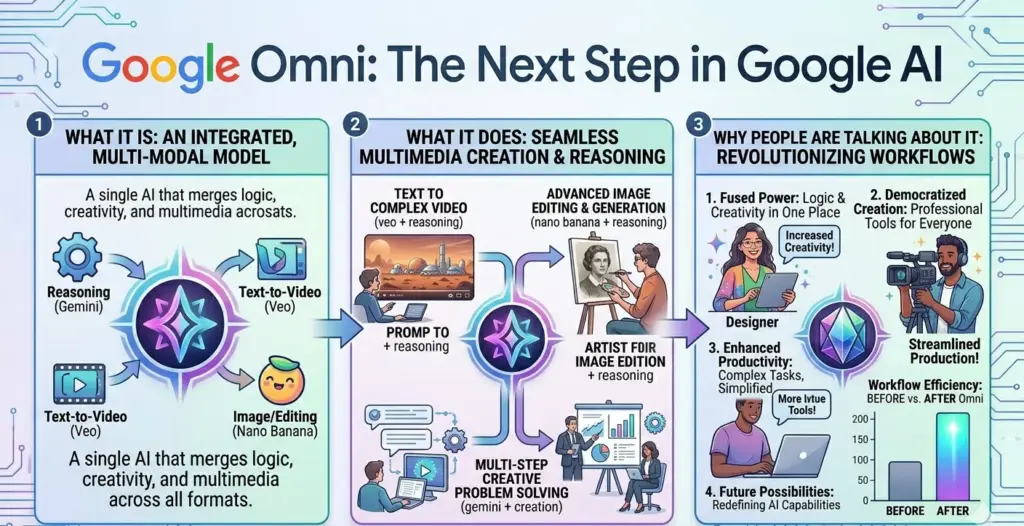
Announced at Google I/O in May 2026, it’s not just another chatbot upgrade or a slightly smarter assistant. It’s a different kind of AI model. One that takes any input you throw at it text, photos, audio, video and creates or edits video output from it. All in one system. No switching tools, no separate apps, no stitching things together manually. That’s the short version. Here’s the longer one.
Table of Contents
What Google Omni Actually Is
Gemini Omni is Google’s natively multimodal AI model. “Multimodal” gets used a lot in AI conversations, so it’s worth being clear about what it means here.
Older AI systems handled different types of media through separate pipelines. Text went through one system. Images through another. Video through another. If you wanted to combine them, the system would process each separately and then try to merge the outputs. It worked, but it was clunky. Things didn’t always match up. The quality suffered.
Gemini Omni is built differently. It processes all media types simultaneously within a single core engine rather than routing them through isolated steps. Text, image, audio, video all handled together, in one pass.
The practical difference is significant. When you give Omni a video clip and ask it to change something, it understands the whole scene the lighting, the people in it, the background, the motion all at once. Not as separate pieces. As one thing. That’s what makes the edits coherent and consistent in a way that older approaches couldn’t reliably pull off.
Where It Came From
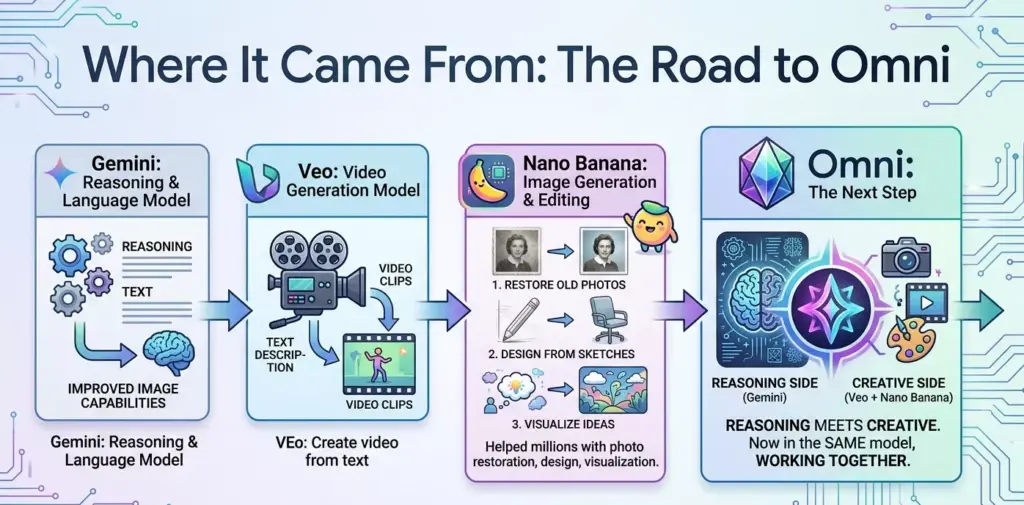
To understand Omni, it helps to know a bit about what came before it. Google has been building toward this for a while. Gemini started as a reasoning and language model good at text, getting better at images. Then came Veo, Google’s dedicated video generation model, which could create video clips from text descriptions. Then Nano Banana, which brought Gemini’s capabilities into image generation and editing.
Since Nano Banana launched, it helped millions of people restore old photos, design from sketches, and visualize ideas in ways that weren’t possible before.
Omni is the next step from all of that. It’s where Gemini’s ability to reason meets the ability to create. The reasoning side and the creative side are now in the same model, working together, instead of being bolted together after the fact.
What You Can Actually Do With It
This is where it gets interesting.
Create video from anything
You can give Omni a written description and get video out. That’s been possible with other tools. But you can also give it a photo and turn it into a moving scene. Or give it a voice recording and have it generate visuals to match. Or combine all three a photo, some text, and an audio clip and let it build something from the combination. Blend any combination of text, photos, and video to create high-quality video. That’s the core pitch, and it’s accurate. Also Read: Grammarly vs QuillBot vs ChatGPT
Edit video through conversation
This is probably the feature most people will find useful day-to-day. Instead of learning video editing software, you describe what you want changed. In plain language. “Make the background look like a sunset.” “When the person touches the mirror, make it ripple like liquid.” “Change the lighting to feel warmer.” Each instruction builds on the last, so the model keeps track of what’s already been changed and maintains consistency across edits.
What makes this interactive video editing rather than one-shot generation is the multi-turn loop. Each edit instruction builds on the previous one, so the model maintains scene coherence the same background, lighting logic, and character identity across successive rounds of refinement.
That’s a big deal for anyone who’s tried to edit video using traditional software. The learning curve disappears. You just describe what you want.
Specific editing tasks it handles
Google’s documentation covers a range of supported edits. Background swaps replace the environment behind a subject while preserving them. Object substitution swap a specific item in a scene mid-shot. Lighting adjustments change the mood or intensity of scene lighting via a single instruction. Video stabilization smooth shaky footage through a plain-language prompt. Character swaps replace one subject with another using a reference image.
These aren’t rough approximations either. The outputs maintain visual consistency across frames, which is historically one of the hardest problems in AI video editing.
The Physics Engine Part
One of the less-talked-about pieces of Omni is that it includes what Google calls a world model, basically a physics understanding baked into the model itself.
What this means practically: when Omni generates or edits video, it understands how real things move and interact. Water ripples. Shadows fall at the right angle. Objects have weight. Hair moves naturally in wind. These aren’t things that had to be explicitly programmed the model learned them from understanding the world.
For video editing, this matters a lot. When you ask Omni to change a background, it doesn’t just swap pixels, it adjusts the lighting, shadows, and reflections to match the new environment. The result looks like the subject was actually filmed in that location, not dropped on top of a green screen.
Digital Avatars
Omni also supports creating custom digital avatars. AI-generated versions of yourself that can appear in video content. The process involves a short onboarding where the model learns your appearance from reference footage or images. From there, you can generate video content featuring that avatar without needing to film yourself every time.
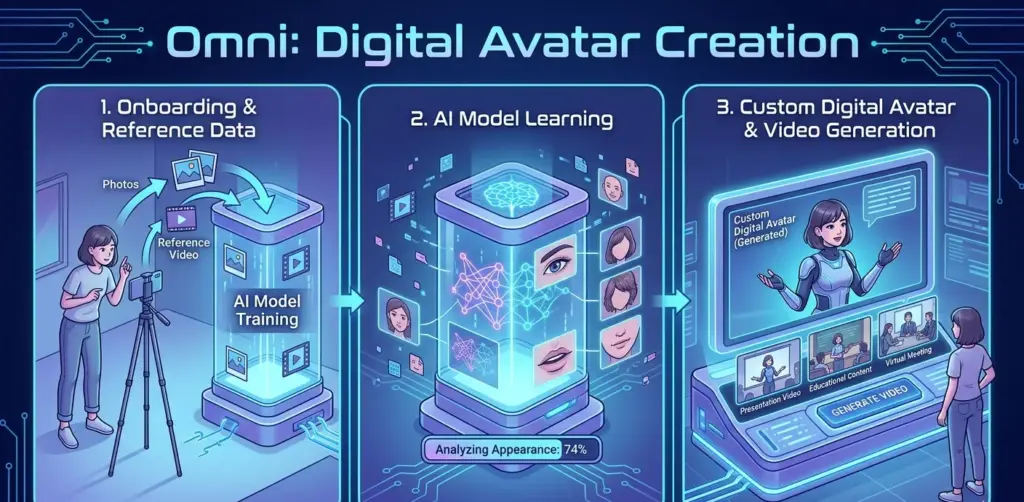
For content creators, this opens up some interesting options. You can produce videos faster, create content in different environments without physically going there, or generate multiple versions of a video without reshooting. It’s still a developing feature, but the direction is clear.
How It Connects to YouTube and Google Flow
Gemini Omni doesn’t exist in isolation. Google has connected it to other parts of its ecosystem. YouTube Shorts integration means you can create short-form video content using Omni directly and push it to YouTube without leaving the workflow. For creators who post regularly, that matters fewer steps between idea and published video.
Google Flow is a broader creative production tool that uses Omni as its engine. It’s aimed at people doing more involved video projects short films, branded content, longer-form creative work — where you need more control over each element. Flow handles the workflow while Omni handles the actual generation and editing underneath.
The Watermarking Side
Any AI video tool raises a fair question: how do you know what’s real? Google built SynthID into Omni. It’s a watermarking system that embeds an invisible, imperceptible marker into every piece of AI-generated content that comes out of Omni. The watermark doesn’t affect how the video looks or sounds you can’t see it or hear it. But it can be detected by tools designed to look for it. Also Read: Nord VPN vs Surfshark VPN: Which is best in 2026?
The purpose is provenance. If a video made with Omni ends up circulating somewhere, it’s possible to verify that it was AI-generated and where it came from. It’s not a perfect solution to every concern around AI media nothing is but it’s a real step toward accountability that a lot of other tools haven’t taken.
Pricing — What It Actually Costs
This is the part most articles skip or make vague. So here’s the clearest breakdown possible based on what Google has published as of May 2026.
Gemini Omni is accessed through Google’s subscription plans — you don’t buy Omni directly. You subscribe to a plan, and Omni access comes with it. The usage currency inside those plans is called Flow credits.
Consumer Subscription Plans
| Plan | Monthly Price | Omni Access | Flow Credits | Storage |
|---|---|---|---|---|
| Free | $0 | No | None | 15 GB |
| AI Plus | ~$10.98/mo | Limited | Fewer credits | Included |
| AI Pro | $19.99/mo | Yes (Omni Flash) | 1,000/month | 5 TB |
| AI Ultra | $99.99/mo | Yes (Omni Flash + Pro) | Highest tier | 5 TB+ |
Flash vs Pro — What’s the Difference
Gemini Omni comes in two versions: Omni Flash and Omni Pro. Flash is the faster, lighter version. It’s designed for quick turnarounds generating content rapidly, handling simpler edits, working well in real-time applications. It’s more accessible in terms of pricing and availability.
Pro is the heavier version more detail, higher quality output, better at complex scenes and demanding edits. It takes longer and costs more, but the results are noticeably better for involved projects. Also Read: How to use Notion AI to organize your entire life?
Right now, Flash is the one most people have access to. Pro is rolling out to Google AI Ultra subscribers first before broader availability.
| Omni Flash | Omni Pro | |
|---|---|---|
| Speed | Fast | Slower |
| Output quality | Good | Higher detail |
| Best for | Quick edits, social content | Complex projects, long-form |
| Availability | AI Pro + Ultra | AI Ultra first |
| API | Coming soon | Coming soon |
API Pricing (For Developers)
If you’re building something on top of Gemini models through the API, pricing works differently. It’s pay-per-token rather than subscription.
| Model | Input (per 1M tokens) | Output (per 1M tokens) |
|---|---|---|
| Gemini 2.5 Flash-Lite | $0.10 | $0.40 |
| Gemini 2.5 Flash | $0.30 | $2.50 |
| Gemini 2.5 Pro | $1.25 | $10.00 |
| Gemini 3.1 Pro | $2.00 | $12.00 |
| Gemini 3.5 Flash | $1.50 | $9.00 |
Who It’s Actually For
The honest answer is a wider range of people than most AI video tools have reached so far. Video editing has always had a high barrier. The software is complex. The learning curve is steep. Most people who want to create video content end up either hiring someone, using basic tools that limit what they can do, or just not making videos at all.
Omni changes the math on that. If you can describe what you want in plain language, you can use Omni. That opens it up to small business owners who want content for social media, creators who produce content without a team, educators building materials, and people who just have an idea they want to see as a video. Also Read: Best AI tools for small businesses in 2026
It’s also genuinely useful for professionals. Faster iteration, easier revisions, the ability to explore options without rebuilding everything from scratch those save real time on real projects.
Where Things Stand Right Now
Gemini Omni is new. It was announced in May 2026 and is still rolling out in stages. Some features are available now. Others are coming. The avatar tools are in earlier phases. The integration with Google Flow is still developing.
With Gemini Omni, Gemini 3.5, AI Mode, Spark, and Workspace integrations all landing in the same I/O cycle, users may need time to understand which model or product is doing what. That’s a fair observation Google launched a lot at once.
But Omni specifically is worth paying attention to. The underlying idea one model that reasons and creates across all media types is a meaningful shift from how these tools have worked before. Whether you’re a creator, a developer, or just someone curious about where AI video is going, this one is worth keeping an eye on.